This is an old revision of the document!
Vim
vim is a modal editor (improving on vi). It can run without graphics, is ubiquitous, powerful, and efficient but is an acquired skill.
- MIT's “missing semester” has an excellent summary of vim functions video and notes.
Vim’s design is based on the idea that a lot of programmer time is spent reading, navigating, and making small edits, as opposed to writing long streams of text. For this reason, Vim has multiple operating modes.
- Normal: for moving around a file and making edits
- Insert: for inserting text
- Replace: for replacing text
- Visual (plain, line, or block): for selecting blocks of text
- Command-line: for running a command
vimtutoris a program included with vim that will guide you through usage – run it from the command line.
Commands
vim $filename→ opens a file in vim. If that file doesn't exist or you opened it in the wrong filepath, you will see an empty blank vim that says[NEW]at the bottomi→ puts you in insert mode so you can freely type and move your cursor around. Says– INSERT –in bottom left.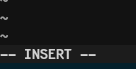
esc→ gets you out of insert mode:set nushows you line numbers

move around
0orHomeputs your cursor to the beginning of the line (in command mode)$orEndputs your cursor to the end of the line (in command mode)Shift + iputs your cursor to the beginning of the line and opens insert modeShift + aputs your cursor to the end of the line and opens insert modeoopens insert mode on a new line below your cursor- up and down arrows move you up and down each line but to move between lines click
gthen up or down arrow uundo last change (in command mode)
Copy and paste
- Click
vto put you in visual mode - move your cursor to highlight the words you want to copy and press
d - move your cursor to where you want to paste words and press
p
close vim temporarily
Ctrl + zputs the vim window to “sleep” and brings you back to the terminalfgbrings you from the terminal back into the last script in vim you were working on
exit
:q→ quits vim:wq→ saves what you wrote and quits vim:q!→ does not save what you wrote and quits vim